
What to check
A site displaying a language or currency, a sponsor’s mark or a link to a provider does not resolve whether an activity is available or permitted for a particular person.
Read the rule that applies to the action
Use the current terms for account actions. Keep the date and exact product description when an eligibility question depends on them.
| Question | Record to check |
|---|---|
| What service is on the page? | The current Winbox site terms and the account page’s own rules |
| What age or location conditions apply? | The requirements displayed for that service and up-to-date official guidance for your circumstances |
| What does a payment request require? | The method’s confirmation, account conditions and the relevant tutorial |
| Does an operator claim cover this website? | The issuer’s current register and exact entity, domain and scope |
Keep site eligibility and legal questions separate
If a form is visible in your browser, its availability does not determine whether you meet the conditions for using it. Start with the service terms and check any current documentation request.
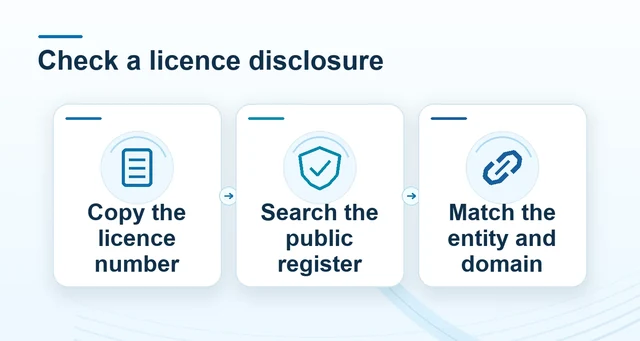 How to compare an operator licence record
Read the full explanation
For a legal or reporting question, note the activity, service, location and date before looking for official information or qualified advice.
For an account question, use Winbox’s contact route and retain the relevant term or message. Ask which version applies if the description on the public page differs from the form.
How to use the record
Read the service terms applicable at the point of use and check age and location requirements before opening an account. For a jurisdiction or tax question, use current official information or qualified advice for your circumstances. Winbox’s terms page explains the website’s role and identifies the contact route for account-rule questions.