
Open the currency and recharge controls
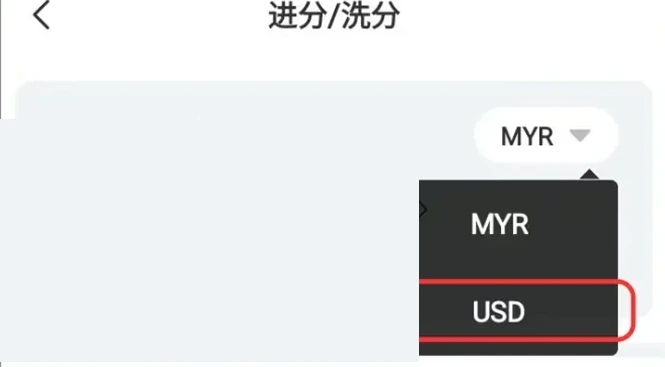
Log in through Winbox, open Me and select Recharge / Withdraw. The Winbox tutorial next selects Switch to USD Currency; if the account is already using USD, that switch is unnecessary. Choose USDT Recharge to open the amount entry. Check the currency label before entering an amount so a MYR figure is not confused with a USDT amount.
 Enlarge image
Enter the amount and select a matching network
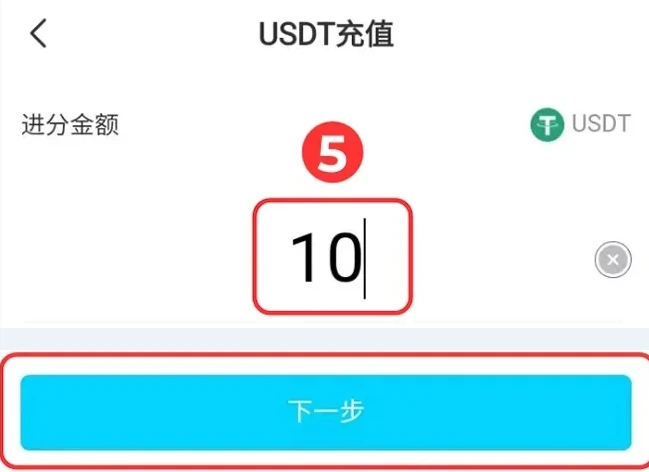
Enter the top-up amount, choose Next and select the payment network offered for the deposit. The sending wallet must use the same network as the receiving instruction. Compare the asset, network and requested amount before authorising a transfer. Limits and fees should be read from the live instruction rather than copied from the sample screenshot. If the network names do not agree, stop and ask Winbox support before sending.
 Enlarge image
| Label | What to compare |
|---|---|
| USD currency view | The account currency selected in the illustrated menu |
| USDT / USD₮ | The token named by the current deposit instruction |
| Network | Same protocol at the sending and receiving ends |
| Receiving address | The current request’s destination, not the token contract |
Use the current address or QR only
The Winbox tutorial offers either scanning the generated QR or copying the generated USDT address. It states that a new address is produced for each recharge round. Generate instructions inside your own account for every deposit; do not pay an address saved from a tutorial image or old message. Match the complete address and amount against the sending wallet's confirmation. A blockchain transfer cannot be corrected by changing the text on a submitted Winbox support request.
- Read the network and address shown for this deposit
- Check both against the sending wallet before proceeding
Compare sent and received records
After sending, retain the transaction hash, network, amount and time. Compare the account's actual top-up and received-amount entries with the wallet record. For a missing credit, send those references to Winbox support and trace the first transfer before repeating it. USDT withdrawal uses a separate destination-entry process, covered in the linked guide.
Prepare a missing-credit query from the original transfer
Keep the Winbox top-up reference alongside the sending wallet’s transaction hash; they identify different records. Include the asset, selected network, exact amount, transfer time and timezone. If the wallet says successful but Winbox has not posted the credit, use the transfer-record guide to compare the chain result and receiving instructions before contacting support. Do not create a second payment merely to test whether the first was credited, and never send a wallet recovery phrase or private key as proof.
Questions, answered
May I reuse a USDT address from an earlier recharge?
The Winbox tutorial says a new address is generated for each recharge round. Obtain the current address and network from your own account for the transfer you are making.