
Identify the draw and format first
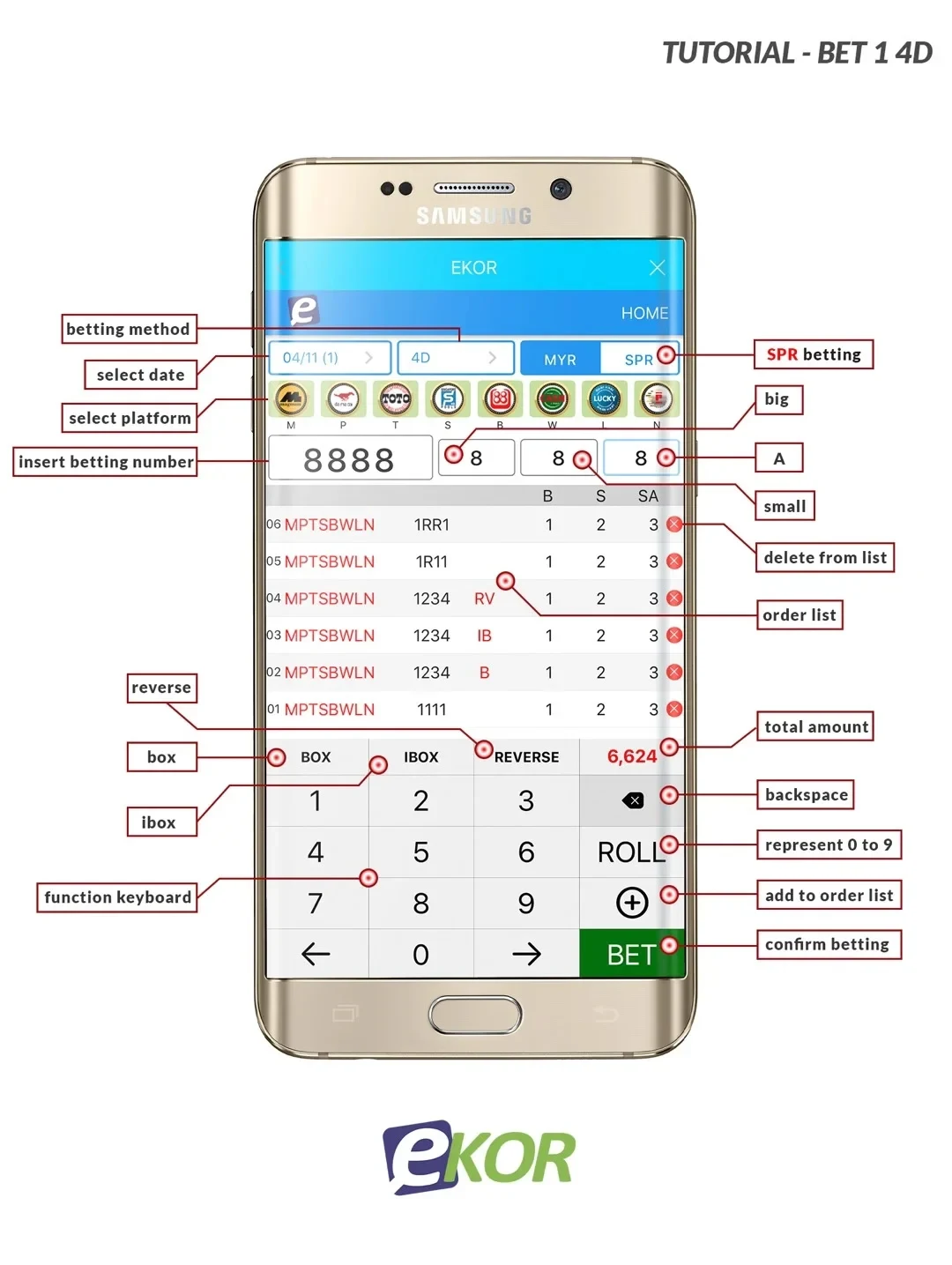
The Ekor diagram labels the draw-date control, platform or operator selection and betting-method selector before the number entry. Check those fields together: the same four digits on a different date or operator refer to a different entry. Keep leading zeroes and read the selected format before entering amounts. The diagram illustrates the controls; use the current account screen for the options and dates offered to you.
 Enlarge image
Review the amount and order list
The illustrated interface separates Big, Small and other format fields, and labels Box, IBox and Reverse controls. These controls can change the entry structure and total amount; read their current rules before using them. Check each row in the order list, delete an unwanted entry and compare the displayed total with the amount you intended. A number in the input field is not the same as a submitted order.
Understand the second layout and keep confirmation
The Bet 2 diagram presents another arrangement of the same task: choose the relevant draw, enter selections and review the order before using the confirmation control. After an entry, retain the account record with its date, operator and format. To check a result, compare that record with the matching official draw. For a settlement question, send the specific reference to Winbox support rather than only a screenshot of four digits.
 Enlarge image
Bet 2: several choices in each digit position
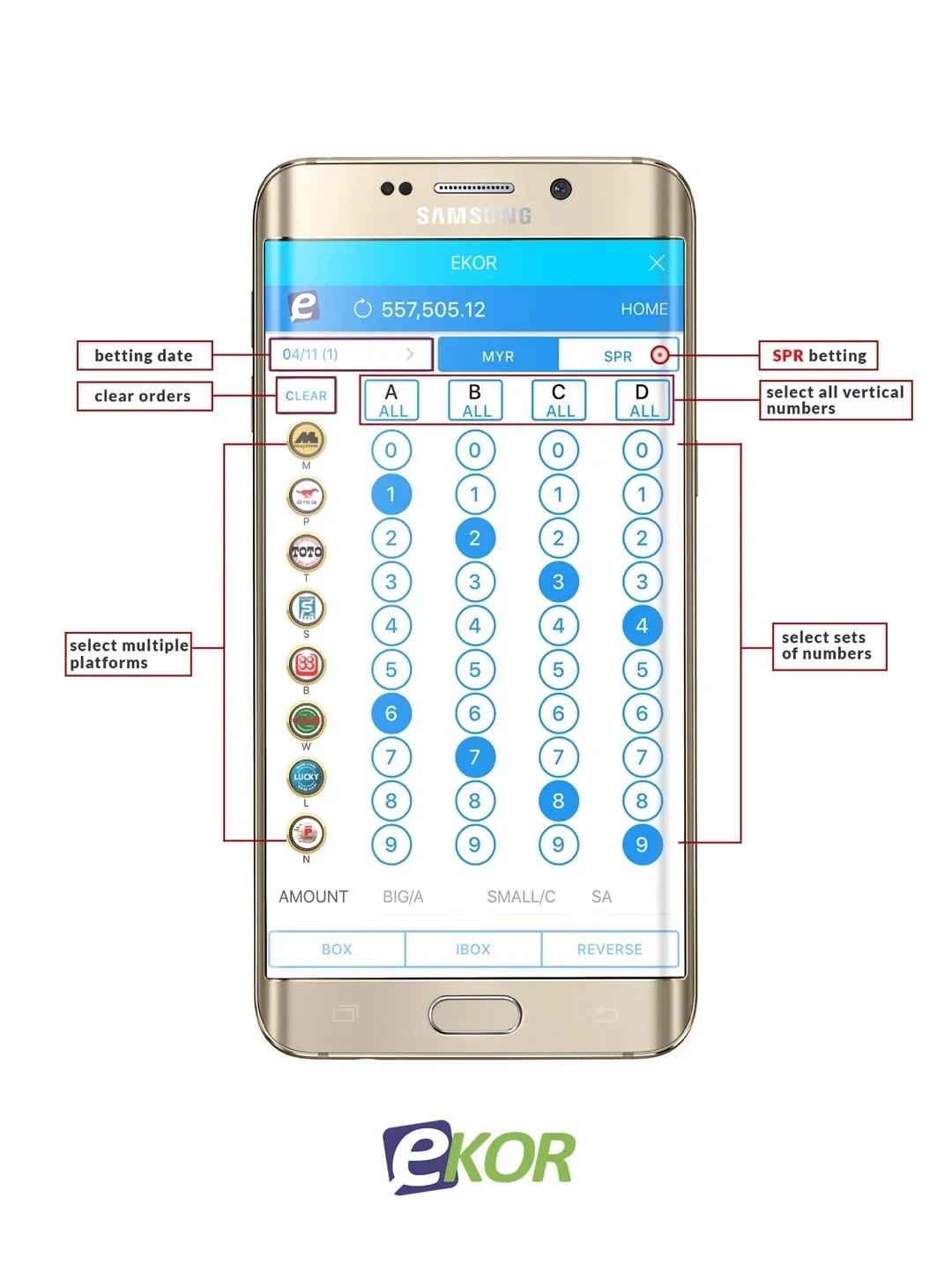
Read A, B, C and D as four separate digit positions. In the illustrated example, A highlights 1 and 6, B highlights 2 and 7, C highlights 3, and D highlights 4 and 9. Combining one choice from each column gives 2 × 2 × 1 × 2 = 8 distinct four-digit sequences. For example, 1234 and 6739 use those choices; 1324 does not, because column B does not contain 3. This is a positional combination, not every permutation of one four-digit number.
 Enlarge image
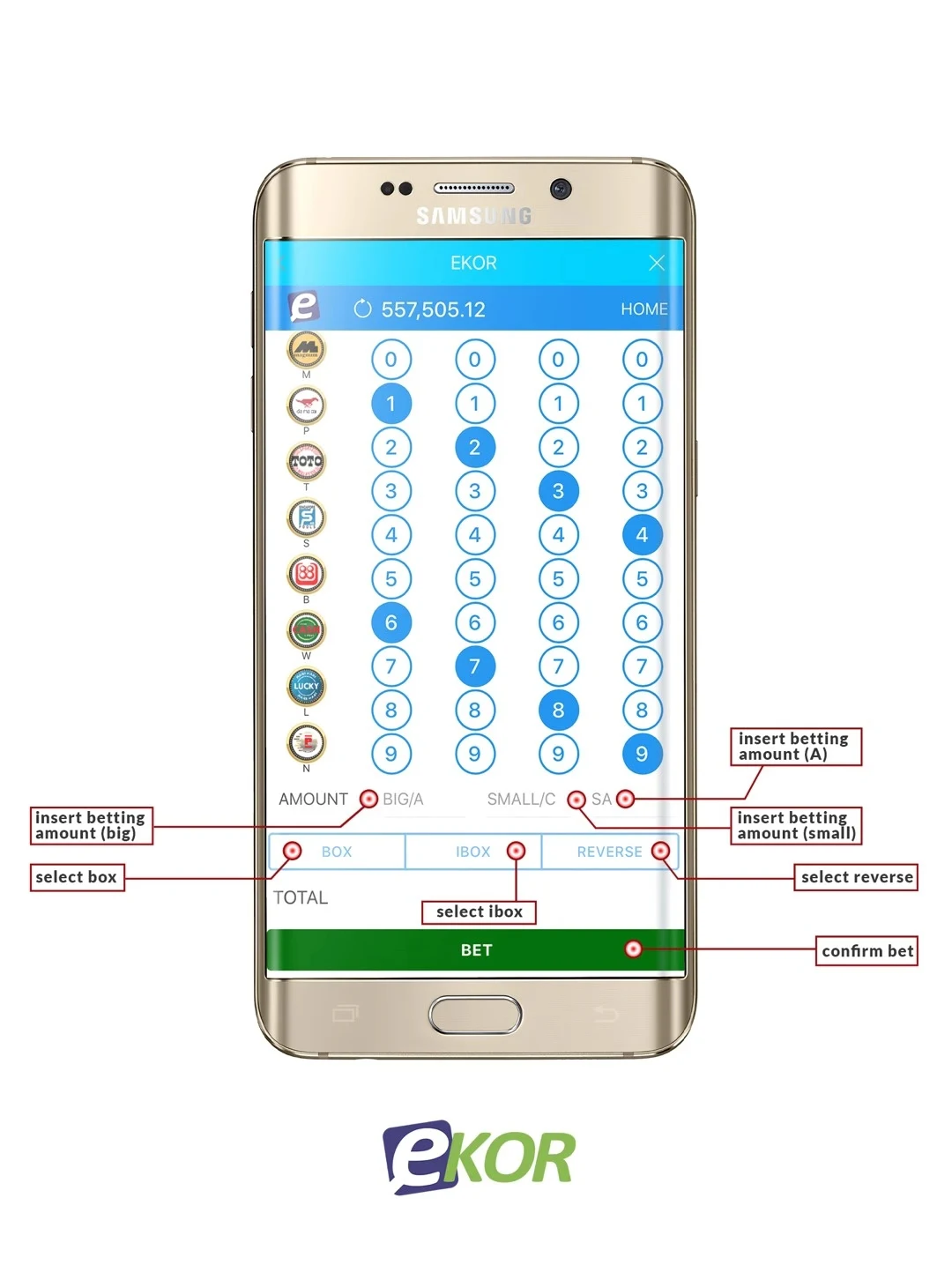
The ALL control belongs to its own column, while CLEAR is a separate control. Before relying on the total, review the highlighted digits, chosen operators, draw dates, amount fields and any Box, IBox or Reverse setting together. The eight-sequence calculation alone does not give the cost: that also depends on the selected draws, operators and amount basis. Keep the final accepted entry list rather than counting highlighted circles as confirmed orders.
| Column | Highlighted choices | Count |
|---|---|---|
| A | 1, 6 | 2 |
| B | 2, 7 | 2 |
| C | 3 | 1 |
| D | 4, 9 | 2 |
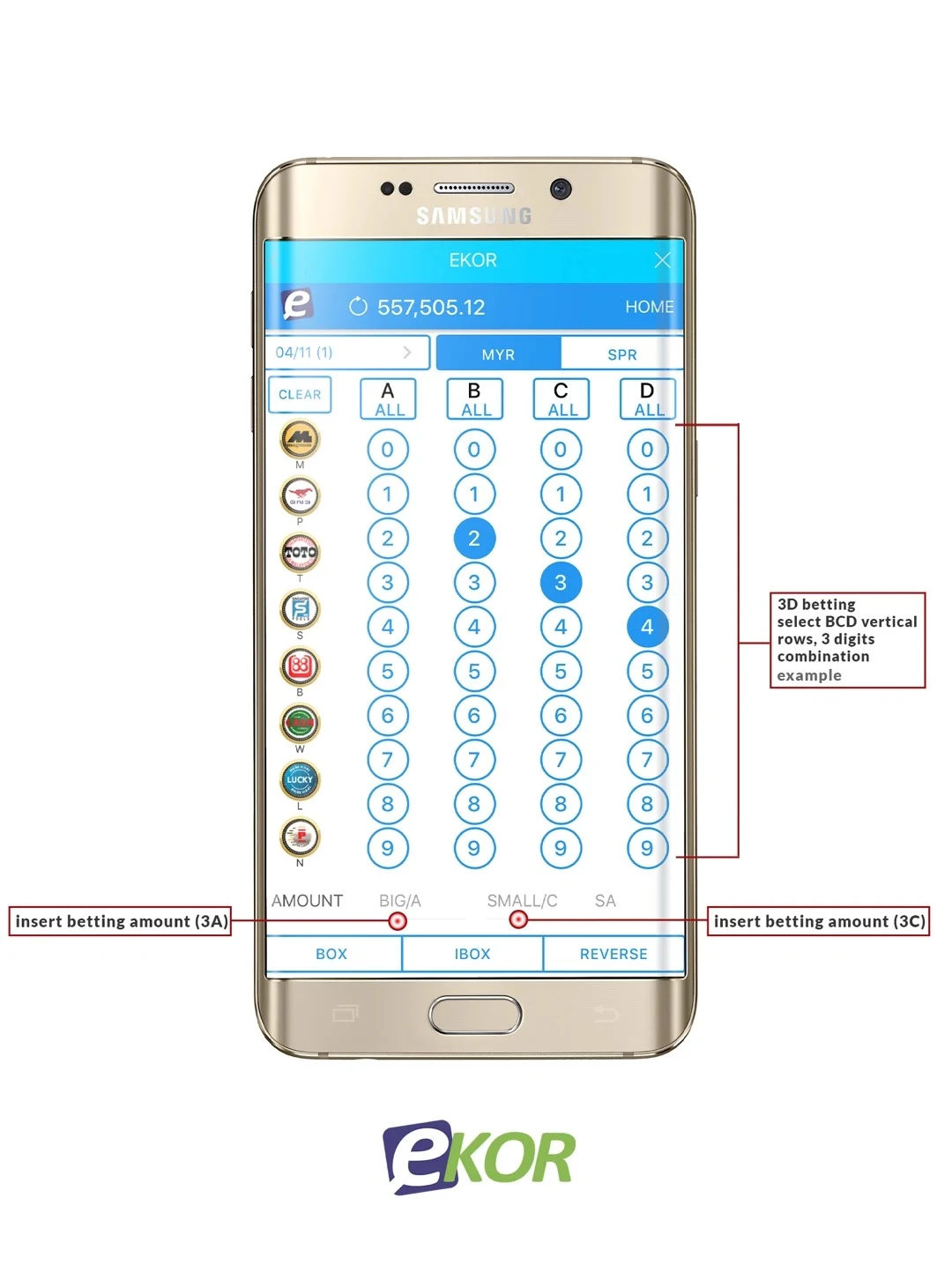
The B–C–D example is a three-digit selection
The next diagram leaves A empty and highlights B = 2, C = 3 and D = 4. Its annotation identifies a 3D selection using B–C–D. Read that as the illustrated three-digit sequence 234, not automatically the four-digit sequence 0234. The same panel points 3A to the Big/A amount field and 3C to Small/C. These labels refer to different product/amount choices; they are not instructions to move a digit into another column.
 Enlarge image
For a later result check, retain the selected digit length and product along with the operator, draw and accepted reference. A four-digit result ending in 234 is a suffix comparison; it does not by itself establish that a three-digit entry was accepted or qualifies for the selected prize tier.
| Illustrated field | What it identifies |
|---|---|
| B2 – C3 – D4 | Three selected positions: 234 |
| 3A | Big/A amount field in the annotated example |
| 3C | Small/C amount field in the annotated example |
Match the prize-table section before reading a figure
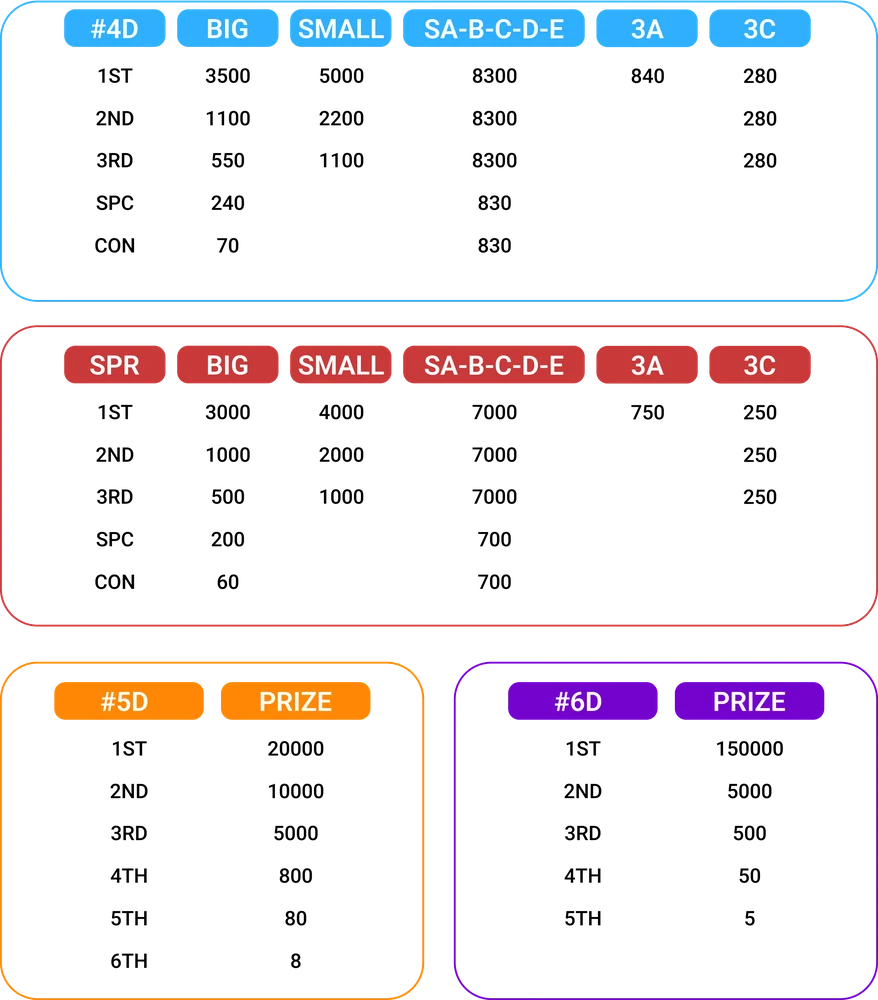
The reference chart separates #4D from SPR and gives 5D and 6D their own sections. Within its four-digit sections, Big, Small, SA–B–C–D–E, 3A and 3C are separate columns. First match the selected product and prize position, then read the corresponding column. Do not carry a figure from the #4D section into SPR, or use a 5D row for a three-digit selection.
A blank cell is not an instruction to use the neighbouring figure. Before calculating an account award, check the applicable dated table, qualifying prize tiers, accepted amount and whether that amount is per entry or shared. The chart alone does not establish the current Winbox rate, its unit basis or every enabled option. Keep the relevant table version beside the accepted record when asking support to reconcile an amount.
| Read together | Keep separate |
|---|---|
| Product section | 4D / SPR / 5D / 6D |
| Selected column | Big / Small / SA family / 3A / 3C |
| Prize position | Main prize / Special / Consolation where listed |
| Amount basis | Per-entry, shared amount and applicable table version |
A final checklist for both illustrated layouts
Bet 1 and Bet 2 arrange the controls differently, but the same information needs to survive into the accepted record. Check a date range carefully if several draws are selected, and distinguish an amount for each arrangement from an overall total. The checklist is a way to read the annotated diagrams and your own summary, not evidence that every illustrated control is enabled for every account. Read the format guide for the Big/Small and repeated-digit examples, then use the results guide when checking a completed draw.
| Field | Review before relying on the record |
|---|---|
| Draw date(s) | Single draw or several named dates |
| Operator and product | Keep both names with the selection |
| Number and arrangement | Four digits, leading zeroes and selected scope |
| Amounts and total | Per arrangement versus shared or overall amount |
| Acceptance reference | Retain the completed account record |
Questions, answered
Does entering a 4D number mean the order is confirmed?
No. Review the order list and total, then check the account's actual confirmation record. Keep the draw date, operator and format with that record.